
I'm doing the tutorial, so here's a list of things that can be square:
Testing text hovering here
      This is quite cool, the "pre" thing
      like how it preserves the breaks n such
      maybe that's why it's called "pre"?
      I dunno
      what's also interesting is that "hr" is basically just
      a thin border, since if you remove the border with
      "style=" it just disappears. '<'
      I am not fixing this
bebe text
alsoI've been using W3Schools to teach me (after using Neocity's tutorial), so most of my stuff here would just be me learning things in order! I think. I'll see how it goes.
What will I do when I'm done? I think either archive this onto my own laptop, or leave it here somewhere if this doesn't take too much space.
Future Me here, March 25th: I don't study literature or read books much >_>, so my sentences may either be hard to read grammar wise, or may just be a tad bit confusing to read. I hope it isn't, but eh, these are just my notes so I don't care about it too much :P
I kind of wonder what the WWW looked like in the late 90s and early 2000s... I could probably ask my dad since he remembers a bunch, but maybe later. I'm learning rn :]
(hover)
Bdo sounds kind of like Bidoof from Pokemon
wait a second.. I didn't even put quotations for the rtl.. why does it still work?
A bit ago (Feb 23) I stumbled upon this person named PetraPixel's website when I didn't know about hard refreshing, and a section talking about organizing makes me wonder about how messy my code looks '-'
okay soo.. I didn't strictly follow W3Schools this time.. I really wanted to fix the margin stuff okay?
>_> The fact that I couldn't change the width of the yellowgreen background with padding was kinda annoying me.
I don't know why the margin shifts when I switch from the index to this page though.. weird.
btw, I've not been writing down dates since I add that as comments in the code for myself, but I'm wondering if I should actually make it visible?
I dunno, I'll think about it more later. I'm going to try and learn in order again now.
Image hyperlink test
email sending testing?
^^^^
only click this if you want your mail to open.
also, I think I get what the difference between "Absolute" and "Relative" URLS is now :D, with this button!
alright, bookmarks! let's test that out. Go back to the beginning by clicking here!
pretty neat!

here's an old image I used for something silly, since I'm on the topic of Images now, I decided to organize my images as well!
Everything should be less messy in my neo files now :D
just remember to add images/.. behind the image source now >_>
now here's that image but stretched.
Also! funny thing! So.. turns out that margin shifting I was talking about earlier was literally
just because of the scroll bar lmao XD. Since the margin is set to "auto", it just moves around like that.
It still annoyed me though so I fixed it by searching it up! Oddly enough, "scrollbar-gutter" is not recognized in CSS yet so it just looks like an error.

Alrighty! image mapping let's go :], I forgot this existed..
For mapping however, I'll just be using a
online image mapping tool since uhh.. getting coords manually sounds complicated.
I'm finally changing the background!! wow it looks terrible on mobile lmao. I know it's not the best, but it's because I drew that with my mouse and trackpad; I didn't feel like actually drawing it right now since it's just a test, so this will be the placeholder for now.
This is just for my future self, speaking of which: FUTURE SELF, the first background prior was just a plain green. :]
Okay so, Picture Elements seem kinda tricky.. but I'll see if I can figure this out.
I think maybe each hr could mark each day? but the second section may have days grouped together I think.
I kind of figured it out! Though, I'm just testing this with a phone. It may not work out for tablets,
and when I zoom in on my laptop it switches the image. That makes sense due to the width changing, but.. oh well :[ maybe I'll figure it out later on,
I don't feel like fixing it right now.
Interesting enough actually, it seems like it stores the other 2 images at the bottom left corner of the main image,
so it doesn't seem like adding style borders will work since it shows up in that corner.
Ooo Favicons! :O once again, this current one is just temporary! I actually hadn't thought about this for my real website appearance actually.. I only really thought of the layout! So, this one may stay longer than everything else, or not :] I just thought of something.
You won't see what I'm talking about unless you inspect this page but I organized my tabbing in the code,
which hopefully means my code is more easy to read for people in general.
I personally didn't mind it.. but after being reminded of it and also seeing my "years ago" self being better at organizing than I am,
there kind of was an incentive. :/
Anyways, onto the next thing to learn :]
| Letters | Num | Sym |
|---|---|---|
| A | 1 | ! |
| B | 2 | @ |
| C | 3 | # |
To be fair, there's a lot of things to do with tables.. so I'm not gonna type a lot and just let the table show for it '<'
I kinda don't know how well I'll retain all this information. Since I'm sort of just doing each thing almost one after the other, I don't think I may remember?
I dunno, but at least I've tried it, and can always look things up later.
I like the fact that there's square bulletin points :] kinda neat.
Just for the sake of having 2 different lists, I'm gonna shove a buncha css into this horizontal list below
This is kind of horrifying to look at code wise ._. anyways, I can't give it a hover animation because
I'd have to put it in the CSS, but that would affect other lists I think so that's why I'm not doing that.(refer to below the div)
Here's a very random thing: I kinda miss eating
vinegarette salads
, I don't remember when was the last time I had one. Other salads
are still good of course though.
Oh also apparently there's a "time" inline, lemme try that out. . Oh, that doesn't really do anything.
I guess it's just for the code. Here's another random thing: IRLTAE
Sorry mobile users, you don't have a lot of hover privileges.
Interesting, I didn't know that "div"s work in this way. pretty neat! I'm just going to type more things here so that the div actually matters. Bingle bongle dingle dangle, lickity too, lickity taa, ping pong, tippy tappy too tah :V
Oh my goodness I just learned about "Classes" :O I'm going to fix up that yellow stuff up there now :D
Testing the Classes on divs now, I bet this'll look really cool!
Yea it does look pretty cool! I'll definitely be using this :D. For them to be the same height though I did have to research, and
turns out the thing that solves that is "display:flex;", which is neat!
Wait a sec...
Flex was just a scroll away! Lol, if only I was patient I could have noticed. By the way, "inline-block" is really nice, better than float in this context I'd think
Something I did actually have to research though was "margin" for this one. I wanted to see if I could center the divs and I forgot margin existed :V whoops. Turns out though, margin has like.. one thing and a secret second thing? I dunno what it does exactly but if I put just "margin:auto;" then it doesn't work since it messes with the height scaling. If you make it specifically "margin:0 auto;" though then it works. I wonder why?
I'm feeling kind of tired today, so I may not talk as much as I usually would. I'll also probably be sketching some ideas down again, since I haven't really been doing that :|
Yea so actually, yea I just ended up sketching layout ideas instead.. I couldn't seem to concentrate on code learning so I just drew for an hour or so I think before getting busy with other stuff. I did do tiny random research on website stuff as well though.
Yeaa.. sorry that's pretty much all I did for that day. I also touched this later in the day today as well just due to working on other art related things yea. I will still be busy today later too, BUT! I'll at least touch Iframes a bit! It seems pretty interesting to mess with and I'm curious about its purpose.
Omg these things sound so cool already AAAAA! I think this is one of the things I was looking for for website stuff! Well- not that I actually searched these up yet, but it was one of the things I've wanted to do. I gotta try this out tonight >:D
mobile users, this can scrollThis is so amazing!! Though I am kind of weirded out by the fact it doesn't need me to list the folder I placed it in.. I wonder why? Cause if images require me to do that, then why not this?
Wow it's March already? dang. Anyways, I'm going to be adding some more stuff to that iframe thing. When I finish there should be buttons there to swap between some things! yea!
Oh.. it's Java time. EEH it's not that bad, at least like the simple stuff it's teaching me right now. I think I'm still going to attempt
to do everything with just html and css though, unless I really want to add something mega fancy I guess.
Here's a little test.
Oh Hello there!
Now that I looked at more of it, maybe I would use just a teensy bit of JavaScript. There's something silly I want to do, but it requires swapping images between eachother.

This is jeffery
I feel kind of bad coding stuff that gets hurt, but it's not like they're actually getting hurt. maybe I'll change the image one at least.
There we go.
I also did some research on how to do the setTimeout stuff because I wanted the image to change back. It was quite complicated
to wrap my head around though, lol. I wonder how optimized it is.
I was given a tip by my father that I should identify the script type as javascript specifically so that devices know it's javascript specifically or something. I added it in now using type="", so hopefully that works..? I may need to do more research to see if I put in the right words though.
Well anyways, I think I'm kinda tired today, especially cause of the weather, so I'm going to work on an asset now! :] If anyone's reading this at all, I hope you have a good day by the way! Keep on learning!
Hello! I don't think I'll be doing a lot of coding today if any, since I'll be working on some other art related stuff! I hope you have a good day though, whoever is reading this. See ya!
Hello again! So before I work on my art stuff again I decided to take a look at what I would do coding wise! The current one I'd be learning about is the "Layouts", however I actually don't know how I'd do it for this page, since you know it's basicallyJust a long, text thing I'm doing right now. I'll at least see what the footer would look like though!
Uhhh.. so.. for some reason along the way of trying to figure out footer stuff (didn't work out the way I wanted btw so I had to do a buncha weird stuff) I
accidentally hard refreshed the coding page after saving and now all the coding colors are gone. I dunno why.. I hope restarting my laptop will fix it though?
Also I don't know how I fixed the footer thing, like for some reason it was just not working but now it is working despite-.. ooh, okay so
for some reason declaring the "bottom" position kept moving it up, since my body doesn't really have a defined height. Anyways, this whole experience was weird.. and
I hope this color problem is fixed soon.
pleaaseeee
Oh no I did it again and now everything's white, AAAAAAAA
OKAY I FIXED IT, turns out I was just soft refreshing and doing a couple real hard refreshes worked. DAYUM. I gotta stop refreshing my code on accident.
Unfortunately to do what I want I did have to search it up and just sorta copy it down. I don't understand what gets it to work however.
Like I've been subtracting things from the code I saw to see what's necessary and what makes it tick, and what seems to make it tick is just the "left:0;" and "right:0;"
allowing "text-align:center;" to properly work. I don't even need a width like the source said! unless it's pulling
the width from my style?? Of course I still need "position:absolute;" though in order for it to actually be contained outside of the main body, but I still
don't understand what left and right do when used together, especially when 0 no less.
PS, if I change the individual values of "left:;" and "right:;" it just.. stops working? I dunno. this is so weird.
I can't even put it as a class either..I don't understand any of thiss aaaaaa
Sorry for the longer text rant, but.. figuring out how this little white text at the bottom works exactly is confusing me so much. There's probably an even better way to do this ngl, but I'd rather find that out myself.
Good evening! I'm typing this in the evening as I have been pretty busy with doing art stuff, been kinda sick,
and I still will be busy tomorrow as well just to try and crunch it out.
It didn't feel right leaving this untouched however, so I'll do something a little silly just to have something down!
Good evening! It's March 6th now cause I skipped a day due to the art stuff. I also mostly just made today as a day to help myself feel better for tomorrow since I'll be out of town for that day. No code learning today but I hope to continue once I'm feeling better! I hope you have a good one! :D
Good morning! It is March 8th now and I'm feeling better! After some chores today I decided to start things off with trying to make a todo list in the index, however.. it turned out
broken like the footer.
Despite giving my index a set height and width like I've been told it requires, for some reason that doesn't help! The relative and absolute
positioning are still breaking for very odd reasons, it doesn't make sense! I remember telling my coding friend about my footer problem and even he was confused.
So.. I guess I may just have to fiddle around with this stuff using the new site. sigh.
Even stranger: The scrollbar-gutter thing is not working properly now either.
It technically does its job, however I've noticed now that there's this white like where the scrollbar should be on the index, and it's bugging me :[
I just hope I don't encounter these same problems with my new stuff..
SOme people seem to be making their "body"s the entire screen with the
body I have currently being replaced with a div, so maybe that would fix my issue.
Oh, my god.
Oh my GOD.
I- I JUST- I JUST NEEDED TO ADD PX AS A VALUE SUFFIX FOR IT TO WORK?!? WHAT?!?!? THIS ENTIRE TIME?!?!?!?!
omg I'm,- IT EVEN SHOWS THAT IN W3SCHOOLS, omg I'm so dumb oml
anyways, unfortunately the problem with the scrollbar-gutter still persists. I suppose I should just let it go.. I mean, this page should be the only one that remains anyways after the update, so I guess it's not too bad.
I'm glad that I was able to do something today with coding! I've been kind of missing the feeling of filling out this page with things & adding new
stuff to it. So, even if it was a bit frustrating, I really liked doing this :D
I'll be focusing on art stuff again now, so yea!
Hiya! March 11th here, I've still been coding technically! You just haven't been seeing it. It's going pretty well!
It does kind of show how much I haven't been
able to properly retain the info I learned though lol, but that's alright, I understand I just sort of went thru the list while keeping some of the simple stuff.
I know there are more stuff on the W3Schools website I need to work on, but I've kind of just been wanting to work on the actual stuff I wanna do! I mean, I wanna do this too but at a certain point you kind of gotta actually use it yknow? Still, I love learning stuff and figuring out what makes them work for the most part, so I'll probably still touch this a little. I'm going to continue working on my stuff now so I hope you have a good day!
Hello! It is March 15th and I've still got progress on my website thing! I just need to figure out animations right now! I feel like maybe I should learn the basics of
JavaScript, since CSS can't do interactive ones as far as I'm aware of. It might take me a bit to start it though just because of some complications I'm having right now ;^^
everything's fine though!
Let us Test!
Alright! That's pretty simple, though I did encounter something that tripped me up. I forgot that the apostrophe is used as inner quotations, so I had some time trying
to figure out why my second button wasn't working
(The original text said "Let's Test!")

Text Separator
Omg, I'm finally gonna touch one of the things they showed in the HTML tutorials :O window alerts
I'll also be moving the .js script along the way,
in case having duplicate html "script" thingies make it act weird.ps, idk if this one works for mobile. It does!! Though I learned another thing!
Turns out "small" doesn't work in Safari, interesting!
Now for some console stuff :O, you guys won't see this one unless you inspect then select the console at the top
Alright! Now the next one is "window.print()", but I don't really like the print thing popping up much since I don't have a proper printing thing on my laptop. I guess I'll have a button anyways just to test it.
I learned of the existence of CC's opacity just for this button.
Correction: CSS's
What? ō_ō What the heck is this?
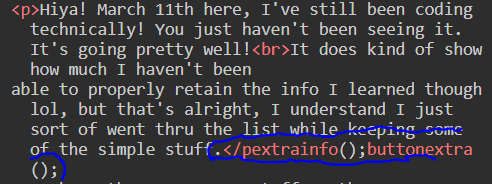
I came back and saw one of my "/p"s being replace with that.. that's very weird. Anyways-
More JavaScripting!! :D
Also I defined the charset to be UTF-8 in the head, since it wasn't letting me type the extra alphabet characters without it, but now it works! Yay! :D
For some reason I can't seem to add a class to this div was above this text????? I don't understand.. I'm doing everything correctly, what?? No missing semicolons, no mispellings, no missing squiggly brackets, I don't understand... I still don't fudging understand. I guess I'll leave it empty & move the stuff.
Oh. So now it works? What the heck man -_- but now it makes my website load slow as heck, so I guess I'm removing it again.
Also! I think I figured out what that weird "pextrainfo" thing was. Turns out it was probably me accidentally pasting "extrainfo();buttonextra();" into that, whoops!
Notes for myself: "let" variables can be changed, while "const" variables cannot. I mean it makes sense in way, I'll just have to remember that "let" can be changed.
This above is the testing for that. It'll only be visible in code, but it'll be in the html this time since i placed it inside of a "script". It doesn't seem to interfere with the main script source, so that's good.
Const can technically be changed apparently, it just only works if you're changing a specific thing inside an array or object, rather than changing the entire thing as a whole.
Oh hey, adding new CSS "class"s is working again, nice.
Also, just messed around with the dates stuff so that's pretty neat, I always kinda wondered how people did that on their websites! Seem like I need more info though for specifics though. Interestingly enough, the current info I put down seems to be invalid mobile, wowee.
I'm gonna make a lil true/false quiz for fun rq :]
Is Parmesan a soft cheese?
Okay soo, as of right now >_>.. that doesn't work. The js code was just made from what I've learned
and remembered so far, so hopefully I learn how to fix this later. I will update this once that happens.
Reveal secret cheese wheel amount with button
Makes more sense when you see the code.
Okay! I figured out how to make the quiz work. I didn't want to have to search it up but that wasn't helping either, but I somehow figured it out myself!
It kind of makes sense that you can't really activate functions that are inside of functions with buttons, since they're not visible on the outside. However if you
have either of the button activate the same thing, but each button has an id that an if statement can read, then myea! I didn't know I could put those inside
of if statements tbf, because yknow, the getElementById thing already had parentheses.
Fixing that also made me want to create a "Reset" Button, but for some reason after pressing any button linked to the function it just.. stops working. so :P idk.
Okay. Why is it not working again. oh my goodness.. yknow what. I know the quiz was to practice booleans, but I just want my darn quiz at this point.
Myea, like it's getting late tonight, but I still kind of want to keep working, I feel like I've taken quite a few breaks today already. No worries though, it's not Late late in the evening. I'll atleast put one more thing down and then I'll head off.
Just made that one for fun, and to practice switch cases. Yea I tried my best for today, but it's not good to keep working on a tired mind. Maybe I'll find my answers to the id usage along the way, but the journey pauses here. I hope whoever reads this has a good one! goodnight for me.
Yello! Time to continue :]
Just to have a break in the "formal testing" I've been doing, this is quite interesting. It is sort of a bit harder to work with compared to html and css since you don't have as much visual feedback, but I think it's still good to learn all the stuff. I don't technically need to learn this stuff for the thing I'm wanting to do, but once again it's just good to know this stuff I think, yea '<'
Anywhoo, time to continue
alright so, there's a lot in this chapter ._. I gotta take a break, whheeeeeh. I left off on concats.
I'mma go draw :]
Good nooning! I dunno, people say good afternoon, but what if it's still sort of noon? Anyways, I'll be continuing where I left off. While I don't think I necessarily need to learn all of these String Methods, I think it'd still be good to know yea? Just in case. Like, if I don't remember them, at least I'll maybe have a base understanding that remains?
That one's kind of interesting. I was using slice for this one, and even if I ended it on what I thought was the correct end position, turns out it had to be 1 higher.
I wonder why.
Once again, all this random stuff makes more sense to me than it does to you, unless you check the code, so sorry about that.
But yes the string I'm using is "Do you want to build a snowman?"
I feel kind of bad about this one above. I found out the solution thru google's AI thing :/ . The problem is is that I tried finding it by
searching it up, but it just wasn't showing up for me! Nothing told me that method chains were a thing! It kept giving me stuff that was unrelated
to my specific situation.
Maybe if I look in the sources it used and find out which one it got the info from, then I'll feel a little better.
Alright, so.. I couldn't find an exact answer in the sources, none of them seem to directly mention chains. The first one listed however did have an example that involved some sort of chain, even if it wasn't a padding chain. Here's the link. You'll find it using a type of chain under the "Fixed width string number conversion" example.
My dad said it's maybe called nested functions instead of chains, and since he said that.. it could've possibly meant that I would have just learned it eventually. Darn it..
Anyways... time to continue. man :[
I'm finally done with String Stuff, AAAA. It wasn't that bad, there's just so much of it! I wonder how much of these I'll remember lol, maybe slice or template, I dunno
Oh, interesting.. I was wondering why JavaScript only called things "Numbers" rather than Integers and floats and more stuff or whatever. I forgot where i learned those from, maybe some other coding language? I dunno. I think I should give myself a lil break before I continue on numbers cause that was a lot of string stuff @_@
Hellooo! Another day another slay >:D I just wanted to say that. I have been kinda distracted today because there was some cool stuff my dad was watching so I haven't done anything for numbers yet at as you can see, BUT! I will be doing it now! Hopefully it's not as long as the string stuff but it still does seem pretty big.
This is still so weird to me. How does a computer thing thing 0.1+0.2 is this?? So wacky '-'. Good to know though, It only happens for some of em.
Cause of the whole left to right thing making the script think "Aight, we're doing concats now".
Wait so.. ALL the other arithmatic thingies work with numeric strings? Just not addition because of concats? DANG that's weird :P
I feel weird not having any images or html fancy stuff after a very long while, so here's this randomc at I drew in ms paint

Keeeetyyyyy!!!
Okedokelyly
Something kinda self explanatory, aside from addition you can NOT mix strings into div/mult/sub/etc, because.. yknow, it's not like it's a variable, so you'd just get NaN
Also, if you use NaN in those as well, then you'll get NaN as a result. pretty self explanatory. if you add NaN with a string though then you'll get NaN and the string.
Apparently if you multiply a number enough times, it becomes "Infinity". Let's test that.
Noice!
Apparently dividing things by 0 also make it Infinity, which is interesting because I moreso thought it'd be called "undefined", but I suppose it does have a different meaning in JS? also, Infinity is classified as a number as well.
You can also make numbers from hexadecimal apparently, as long as it has "0x" as a prefix. Am I using prefix correctly? I dunno.
Hello! I'm onto the Number Methods now :] The remaining stuff in the JS Numbers sub chapter I had to look at seemed pretty typical, like objects and numbers that are similar to eachother being true for == but not for ===, and the fact that you could turn numbers into objects in general.. yada yada. I don't even know what the use is for those things yet other than W3Schools being like "Don't use it cause it's mega slow" so yea. I mean I'll get to that in the Objects chapter.
Anyways, time for the grind
Wow, toString() sounds pretty cool already ngl, I think it can help avoid concatting, let me see..
Nice!
valueOf() Is an interesting one.. since it doesn't really seem to be needed. It basically just returns a number as a number. pretty simple stuff. Apparently it's used to convert objects back into primitive numbers though, but I don't think I'd really be using that myself anytime soon, maybe until the Object lessons.
Also, I dunno the difference between global JS methods and Number methods, but apparently there's a difference. Here's Number(), a global JS method.
You can also use a Date() variable for Number(), and all it does is return whatever number date away from 1970-01-01 it is into milliseconds.
Basically, 1970-01-01 is 0 milliseconds, and a day passing (1970-01-02) is 86400000 milliseconds.
parseInt() is one of the things I was thinking about I guess! So.. all this does is returns a number string into a whole number, no decimals. It allows negatives, and spaced numbers as well, but for that one it only displays the first number in the group, same thing if it had a comma. It does not accept letters either, displaying NaN.
I'll just have one example.
parseFloat() is the same as parseInt() except it displays decimals as well. It has the same uh.. I dunno what word to use so I'll just say "quirks". It has the same quirks that parseInt() has as well.
Good evening! A bit tired from stuff today but I'm just gonna finish up the Number Methods stuff, since I didn't get to do that yesterday. I hope whoever's reading this is havin an alright day, and a better day if not :].
Oh, so the remaining things were just stuff for the Number object. Interesting.. Well, I'll just write down the easy ones but try to understand whatever
"Number.isSafeInteger()" means.
Number.isInteger(), is it an integer.
Number.isNaN(), is it NaN.
Number.isFinite(), true if not Infinity or NaN.Number.parseInt/Float is basically the same as their normal counterparts.
Number.isSafeInteger() though.. I gotta think about this more. At first I thought it was just "don't surpass 16 digits" or.. actually wait I just read the explanation. Alright.. that's kinda weird. I still don't get it but, that's okay, I probably don't need to worry about that with what I'm doing.
Okedokely, now time for the properties. Oh wow, we're getting into ALL CAPS territory :O dayum.
Uh.. I don't.. understand the point of this one, but I'll have it shown.
It's interesting that it doesn't have a parentheses thing at the end.
Oh okay, so these are just things that represent stuff, Interesting. I'll just type all of them down then, maybe on a more focused day I'll look at these again just to think of them a lil more.
Bitwise stuff is next, but I'm feeling kind of tired and I have to attend something tonight, so I think it'd be best for me to look at this at a proper time. I hope you have a good one!
Good afternoon! I took a break yesterday just to chill and what not :] Looking at Bitwise stuff with fresher eyes... 2 things still kind of confuse me, even with the examples :/ I'll probably just be reading this one more than typing it, cause feel like I need to actually wrap my head around it first before anything else really.
Oh wow. So actually I didn't know I could just put the "function example() {}" stuff as a thing that "getElementById" stuff could actually use! for example:
document.getElementById('whateverp').innerHTML = example();
Wowee
I can't really seem to understand how things work without having them as binary, but thankfully i can use toString(2) for that! I had completely forgotten that was a thing toString() could do until I saw it on this page. Well not this page, but you know. Anywhoo
Okay you know what, nevermind! I still have no idea how this function stuff works in general (aside from buttons) :]. I hope I learn it sometime soon though, but if not then I think that one JS Query thing may help? I dunno, I don't really remember what it does. Anyways I'm just going to make another html "script" thing and edit it until it works yea :V
Okay so XOR still confuses me.. but in a binary, using (# ^ 1) seems to turn the last/first bit of the number into the opposite of whatever it is already. 100 turns to 101, 101 turns to 100. I wonder what it means with 2's though. Oh! Nevermind, I see how this works now! I think so at least. Basically, whatever the right part of the operation is (5 ^ #) it changes that specific number coming from the right. For a better explanation, instead of making 100 into 101 like 1 does, 2 makes 100 into 110.
Oh wait a sec, if I make it (5 ^ 3) then.. it's 110. Is the right placement just sort of like an inverted binary or something? okay I'll put down an explanation I typed into here. I hope it's understandable? I dunno lol
So, in the best way I could explain possible: The first variable of XOR determines the starter number, while the second variable of XOR is like a phantom number it uses as a reference.
In binary, it takes the first number, compares it with the phantom number, and any position the phantom number’s 1s are ontop of gets flipped around.
Examples:
(5^1) 101^001 = 100 (4)
(5^2) 101^010 = 111 (7)
(5^3) 101^011 = 110 (6)
(5^4) 101^100 = 001 (1)
(5^5) 101^101 = 000 (0)
(5^6) 101^110 = 011 (3)
etc....
It really makes more sense when you look at the binary rather than just the plain numbers. The W3Schools explanation didn't really make sense to me as well, so I
just had to figure it out for myself. Maybe their explanation makes sense for more smarter people idk lol nfsdjfdnsjkfsdn
BROOO I JUST FIGURED OUT WHAT "OR" DOES LET'S GOOOOOO
Uhhh so basically, same thing as XOR except it doesn't flip things around and only places 1s
Example: 101|110 = 111,
101|101 = 101 (because no 1s are placed over 0s)
Dayum.. this stuff is complicated but like.. I kinda like figuring it out :O
I may or may not pause for today though and continue learning this bitwise stuff tomorrow, I gotta work on something that someone wants me to work on as well this week. So for now, see ya! :D
OKAY I LEARNED "AND" LMAO, sorry I'm like on a learning streak rn but I actually gotta go after this one fndjkfnsdfd SO:
AND basically uses the same logic as the other two HOWEVER, it only shows the 1s that the starter number has.
101 & 100 = 100,
because the "phantom number" I call it for myself does not have a 1 in the first bit.
101 & 111 = 101,
because while the "phantom number" has 1s all over, it does not change 0s.
101 & 001 = 001,
because similar to the first example, it does not have a 1 in the 3rd bit placement.
Okay to be fair, I kind of just ignored, didn't acknowledge that there were written examples (not code examples) for OR and AND on the page just now, but that's okay >:D It's
probably better for me to learn it by doing it myself anyways. Kinda silly that I missed it thought lol
Anyways, I'm gonna do other stuff now. See ya!
Alrighty! So before writing this I already figured out what NOT does :] I just wanted to figure it out cause yknow, why not. I mean once again it probably says something on the W3Schools website, but I think figuring it out myself still sort of teaches me better than what the website tells me.
Okay so NOT, it basically just flips the numbers around. Okay so that's not entirely incorrect but here's the thing. For some reason the website says it ~5 in binary would be 10, but that doesn't make sense to me at all. I mean yes flipping a binary 5 (..00000101) would become ..11111010, but that doesn't register to me as a -6 and even converting
it to a binary string doesn't show that either! It shows -110. So, I gotta figure this out more later cause I'mma do something rq.
Okay I'm back.. and I looked into negative binary again and it basically just shows whatever I've already learned from W3School's website. Maybe the reason why the binary doesn't make sense when converting x = ~5 into a binary string is because of the conversion? like maybe it's just taking the number and turning it into binary and just slapping the negative sign onto it.
I suppose since it may just be an issue with the code I'm using to understand it, I'm just going to swap the thing I crossed out.
Okay so just as a redo: The binary NOT operation (~) seems to flip the 1s and 0s of whatever number it is used on. As a result from this conversion however, the answer seems to
always be 1 number higher (or lower in negatives case) than the number that is being converted.
Example:
~ 5 = -6
~ 101 = 010 = 10 (still technically -6)
I don't quite understand what negative binary looks like yet (even w/ research)
so I'll just believe whatever the websites and normal conversion is telling me.
So myea, I think I'm done with that.
Okay so I think the difference between Signed Right Shift and Zero Fill Right Shift finally clicked in my brain. I didn't figure this out myself and just used the school thing since I dunno how to show the entire 32 bit integer thing anyways
So, Zero Fill Right & Left Shift basically just shift a binary however many 0s to the left or right the person wants, it fills with 0s specifically.
ex: 5 << 1, (shift 5 to the left by one 0)
101 << 001 = 1010 (adds one 0 in front)
Right Shift is similar in that regard, just on the opposite side.(but uses >>> for Zero Fill)
Signed Right Shift however, just duplicates the bits on the left and shifts the main binary number by however many spaces to the right. Because of this duplication
instead of adding 0s, it allows negative numbers to be used and shifted to the right. I assume the reason there isn't a "Signed Left Shift" is because it wouldn't make sense to
duplicate binary bits from the number itself.
If negatives are used in Zero Fill Right Shift, you're just going to get some random giant number because you're basically doing this:
111...011 (-5 I think) >>> 000...001 (1) = 011...110
(giant random number: 2147483645)
Adding that zero at the Very Beginning Basically turns it into the most giant positive number there is! (Yes, it's a positive number, so I assume the 0 or 1 that's in
front of everything in the 32 bit integer is what helps it determine if it's a negative number or not)
Maybe that's why Signed Right Shift is >> rather than >>> despite not being Zero Fill, since you'd more likely use Signed Right rather than Zero Right for everything.
Alrighty! I think I'm finally done with the Bitwise sub chapter :D The rest is just assignments of the stuff I already learned, basically instead of just having the operation
do something like (5 | 5) or whatever, you can add a equal sign and do some variable stuff or whatever idk I'll just have an example lol
let x = 5;
x |= 5;
document.getElementById('example').innerHTML = x;
That basically does the same thing as (5 | 5), just changes it later or something I guess lol. This cannot be done with NOT stuff though, I tried and it showed up blank and I think it's because it just uses 1 number rather than 2 so it's not like a whole operation or smthn idk, I'm a bit brain tired rn :V
I'm gonna draw a lil celebratory thingy for myself just to mark this occasion as a "yippee!!" :D I still have BigInt to look at but that's okay, I'm just happy I mostly figured this stuff out :]

I'm taking a peek at BigInt now, seems simple so far.. I'm going to test it out
You can do math with BigInt numbers that use n, but you can't do math with BigInt numbers and normal numbers as an error will be placed instead. The way to fix that is by placing the BigInt into Number() to convert it into a normal number.
It also works with other things too. In summary/TLDR, BigInt numbers are compatible with basically all operators and comparison thingies n what not as long as they're put up against other BigInts. They can also be used in normal stuff, hex, octal, and binary. I dunno what Hex and Octal is in this scenario but okedokelyly.
Well, nice! I'm finally done with numbers!!! :D
I can finally touch functions now >:D I gotta say though, I did kinda enjoy doing that problem solving stuff for myself
in this chapter. It made me feel pretty smart :]
Duplicating Celebration Image!
That's all for tonight! See ya next time!
Before I go actually, I wanted to add a sorta bookmark button since this page is getting kinda long. I'm trying to figure out how to make it look fine on mobile tho but I know it's not that important. It's bugging out with my phone anyways so I guess I won't bother with it much. Anyways, see ya!
Eyy! Welcome and good mornin, or actually good noonin or whatever idk lol. Time for Functions! I'm gonna start off by uh, writing a function! Lmao. I actually didn't know a function could be called by a variable when the variable is used though. Pretty neat! I'mma try that. I actually didn't know that return was just a shorter form of giving info to whatever you want to appear or whatever. I dunno how to word that lol, I was gonna say "to whatever you want to print" but print in JS also means to just, literally print something out, so >_>
Ayyy!!! Now I don't have to put a buncha scripts inside of here, I think! I dunno I'd have to do more things.
Ahh, I completely forgot the things inside of parentheses were
called parameters. Well, hopefully I use that more often.
The way I see parameters working inside of function parentheses stuff is like,
they're declaring whatever's inside as a variable or whatever (if it's just that), and they can use that inside of the function.
Then, when you use a "let" that's outside of the function use the function, you put whatever you want the parameters to be inside of that function's parentheses or.. something.
I don't know if my words make sense to you guys but it hopefully sorta does to me.
Since I've done this before I'm just gonna type it rather than do it: Variables declared inside of squiggly brackets are local to that bracket. They cannot be used or pulled from outside of that bracket. I wonder if that means the function parentheses act kinda like doors with permissions then, hmm... >_>
I think it's probably shorter to just put the function in the "innerHTML" thing rather than declaring it under a different name as a variable, but I could see that method to help organize stuff a bit, or maybe just to use it multiple times like I just learned a few minutes prior lol. Or actually now that I just tested something, maybe it's just to help organize and make things more understandable.
Okay I had a lil break cause I was tired and couldn't focus but I'm gonna focus a lil more now :]
Wait.. you can execute a function by just.. writing the function? It didn't teach me that :/ it only mentioned it in the lil exercise lol
Oh okay so apparently that one is called calling it,
"and by calling 'it', I mean my-" Okay I'm kidding, but calling it just calls it, it doesn't output the function's result. You're kinda just calling it without telling it where to go I assume, so that's why.
Ooo interesting! You can call the function looks like if you just, make the innerHTML stuff execute a variable that calls the function without the () at the end. I hope
I wrote that correctly lmao. Here I'll give you an example:
Calling showMe() without the ():
Also, yknow how I mentioned parameters or something? if you call on a function that uses a parameter but don't give it anything to work with inside the (), it returns as NaN cause it has nothing to work with. Since it returns something, I might as well test it :p
Ah okay, I just got to the Returns section and yknow, makes sense why I was getting errors for stuff placed after the return. Once the return is touched the function stops executing. I wonder if it's like a cousin to "break;" or something?
Another thing, so it says
"If a function does not return a value, the return value will be undefined"
But, I don't think it necessarily needs a "return" specifically? Since in my previous js functions I could just have an output with "document.getEleme.." yknow the rest. So it just needs Something to give an output, but not specifically return. I guess it probably means this in the case of a function being executed by like.. something. Idk. I don't quite understand it, or know how to explain it. It just works? Like it works if I pull it out with a button, but it doesn't work if I pull it out from within the script? I dunno
Return Early Test
Alrighty, I gotta do something in a bit, and.. man I'm getting kinda sleepy. Well, hopefully I'll have time to come back later. Bye!
Welp, I was too tired >_> whoopsie. Anyways, time to continue, I hope ya'll are doing okay today :] If not, then I hope it gets better for you.
I tried replicating one of the W3Schools examples without looking more than once just to keep my brain a bit more active during this, but I uhh, kinda forgot some stuff so I ended up looking at it again >_>. The stuff I wrote down was mostly correct though! I just kinda forgot "arguments" had no 'ue' and had an 's', and one of the other stuff I wrote was fine but it was supposed to be inside an if statement that I completely forgot was in the example >_>
Man, I will say.. I think coding was a lot easier when I was doing more than just coding... but that's what it'll be for now unless I decide otherwise.
I think I'm going to draw something for now actually, like, maybe another background I thought about. I kind of just miss working on more than just text lol, so maybe drawing will help me feel a lil less tired.
Yello! Sorry yesterday was short, I did end up just working on background related stuff yesterday, and other stuff as well :] I think I'm going to work on something someone wanted me to work on today a bit though, but I'm still gonna at least touch JS a bit today :D.
Alright! So I'm gonna try and replicate another thing, just to keep myself workin yknow? It'll be a "sum of these numbers" thing.
Yay I did it!! :D and this time without looking back >:] Also this thing I'm about to say is common sense to me I think at this point, but arguments in functions operate in the
order they are placed in. For example, if there is exampleFunc(a, b) and someone puts in the arguments (5, 7), it will always be a=5 and b=7. If you swap those numbers around
(7, 5) then instead it will be a=7 and b=5.
Oh, interesting!
Variables can be arguments as well apparently, so if you have something that is like "let x = 8; let y = 7;"
specifically Outside of the function, then you can use those variables as arguments in the whole document.getEle...innerHTML = varTest(x,y); Pretty cool! It specifically
has to be outside of the function ofc, because variable declarations that are inside squiggly brackets Stay inside those squiggly brackets, and can't be used outside.
Just to have another thing tested out, I'm going to show what happens if you leave an argument empty:
Okay that was kinda embarrassing.. >_> I couldn't make a simple equation thing. I was doing "let x be whatever" stuff when literally I could have just used "return" for it
This was a fix to the undefined/NaN problem, all you really do is basically say: "Is x really really undefined? If so, set x to this" and same thing with others if needed.
Here's one more thing before I go and look at the thing I wanted to look at, it basically helps the function account for an indefinite amount of arguements.
To be fair, I don't thing I remember learning "for (let a of b)" in the for statement stuff. Let me look at it again. Yea no, I don't see it.. huh. Also for some reason this specific one requires you to have a "let x = examp(1,3,5,6,6)" whatever thing underneath the function in order for it to work, it didn't seem to work when just placing it in the executor, but it also didn't give off an error either for some reason.
Interesting.. I took a peek into the JS Function Expression stuff and it seems like you can put functions inside of variables! That's kinda weird :V anyways, I'll touch up on that later cause I gotta do something. See you later hopefully! I think if I don't do JS then I should give an update at the very least, it felt kind of weird just not doing anything after I said I was gonna come back that one time.. but I suppose I have technically been coming back, just not in the same day :P
Update: CSS is killing me rn 🕱
I LIVE!!!! I got that figured out, rn I'm just having it run in the bg to see how well it works overtime. While I did figure out all the stuff last night, I am gonna take a teeny break since I did all the separate layer stuff today :]
I live again!! Just didn't do anything yesterday. My motivation's been a tad kapoot but I'm feeling a bit better today :]. Nonetheless, I will maybe focus a bit more on my new layout in comparison to learning stuff, but I'll still try to do a bit of JS learning today. If you're confused on dates, then today's the 30th, and last post was the 28th.
Hmm.. odd. I dunno why this horizontal rule looks thinner than the others.. kinda weird. They're all just copy pasted so yea that's very weird :/ anywhoo.. here's a test of defining a function as a variable.
Okay so I put this inside the script but I might as well write it here: "Oh okay, when making a function, DON'T FORGET THE "function" part lmao :P. it doesn't
even need a name either since the functVar is what would activate it." I just forgot the most basic thing ever lol, maybe putting it inside of a variable rather
than just having "function" at the beginning like most things just sort of maybe made me forget it, + it being a small while since I did JS.
Also, it's probably
better to not give the function inside the variable an actual name, as it just kinda confuses stuff (at least for me) because the variable name is used as the name when
providing the arguements.
Oh lol it literally mentions that right as I looked back at the page '>'
This one above is testing uh, executing a function by using a function inside of a variable. Sounds weird, but it's different from the previous one I promise here I'll show.
Then the document.getElem...innerHTML = run(functTest);
For some reason there's a "Too many errors. (98% scanned)" thing that pops up next to the document.getElement thingy, but I dunno what it's for cause it seems to work fine.
Maybe it just doesn't make sense to do things that way, I dunno :p
Thingy that makes sense: You cannot call function expressions before their declaration, because
yknow, they're declared with variable stuff, and variable stuff are usually done first (unless you use "var" I guess? possibly?). Unlike the expressions, normal functions or
"Function declarations" can be pretty much anywhere; below variable declarations, above, you name it (within the same file ofc).
Btw I dunno how to use semicolons, does that
look okay? I know you can't tell me but eh idk lol.
The page seems to be telling me that there's an important reason as to why function expressions exist.. but I don't get it yet. :P maybe it'll click later.
This thing uses a function arrow thing. It looks like this "=>", and pretty much makes function expressions shorter and less confusing looking I suppose? It doesn't
need "function" or "return", or even the curly brackets! Kinda weird ngl, but I think that definitely helps it be less awkward to type. It's still a function expression
no matter what though, so it can't have any calls/executions above it ofc. If it doesn't have parameters then you just leave the parentheses by themselves, Ex: "()".
If it has
just one parameter however, apparently you don't need parentheses either! wowee.. Here, I'll make an example for that.
You can still use parentheses if you'd like to though. Just for clarification, functions without parameters do require parentheses.
Function arrows can only have no brackets or return statements if it's a single statement. I assume with multiple it'd just be plain confusing to read, and for the computer
to execute.
Also, I cannot really understand what it means by the "this" stuff, it just kinda brought it out of nowhere imo.. but I'm assuming you can't use function arrows
with the "this" stuff. like.. "return this.something;". I dunno
Time for the quiz! :] Bro, the quiz is weird >_> why couldn't it have just used what it uses for the exercises? fine.
Nice! I got 8/9 correct. The one I got wrong I technically already knew, it's just.. I got confused when it said "which one calls the function?" cause yea it sounds like a simple answer really, but is it asking me which one gets the result or which one just calls the function, yknow? So without that clarification, I wasn't sure that the answer was "example()" rather than "example" even though it was "example()".
Pheeeyeew, I finished functions!! YAYAA!! [insert third celebration here]. Okedokely I'm gonna do some stuff and then work on my website stuff again now >:] See ya!
Eyoo, it might be a bit silent here for a bit cause I'm working on art stuff again and this one is a Doozy to work on lol. I feel like I may have a partial art block too
but I'm not gonna think about that too much and just keep working on it whenever I feel like I'm able to :P better to put something down than nothin at all right? :].
Anyways, I just wanted to give this lil update and I hope you are doing well. Have a good day!
Oh one more thing actually: I added a "To the End" button at the top since.. I realized it's also inconvenient to scroll all the way down here lol! So hopefully that will be better :] Anyways, cya!
Ello, good evenin :] I made some more progress on stuff after easter weekend! It was kinda hard since working with a digital perspective ruler cause those feel too restraining, but it turned out pretty good in the end :D. I'm debating on changing the purpose of the piece though, as it was meant for one thing but it seemed good to be some sort of placeholder thing instead. I'll think about that more tomorrow, it's just tough deciding on it since I worked fairly hard on making it for one specific thing sorta, albeit being unsure during the process. Anyways it just hit 12, I hope you have a good night!
Hiya! It's uh.. almost 2am lol :P I just finished up working on my project stuff today, it's not done yet but I kind of wanted to fix a really annoying thing that would help make things look nice :] Anyways, I'm going to bed now. I hope you have a good one!
Ello! Don't mind the white bg thumbnail, I was just changing the positions of the css to prepare for things. It's kind of confusing to know when or when not to use ".." in the url... because in my personal files I had to add dots but for this one it seems like I didn't have to, and if I did then it'd stop working. Kinda weird! '>' I'm almost done with my current iteration of my project, so yea! pretty cool :] I'm busy for tonight though so I won't be able to do much of anything I'd say, but I hope you have a good night!
April 14th
I am quite nervous ;'<' I hope I have everything done! (at least the things I wanted to do pre-update) aaaaa. I think I'm going to update everything in maybe an hour or something, just to get it over with, like peeling a bandaid!
June 1st
Yello! Just using this thing here to write down something I'm thinking about, I dunno.
So I've not really been feeling like learning JS in order on W3Schools recently just because.. I dunno, I just want to get things done now I suppose. I still try to learn
the things I find online to the best of my ability though! Like recently I found out about "classList.toggle" so I can toggle classes on and off, and that one's pretty self
explanatory though. There's also "document.querySelector('');", which I can assume looks for the first thing in the document it can find that matches what's in the
parentheses. I also learned about "window" and more specifically "window.clearTimeout();" and "window.location.href = '#id';".
"window.clearTimeout();" I would think is usually paired with "setTimeout(funct,#);", and it's used to clear the timer so it doesn't keep running! Pretty neat :].
I used that to properly set things to "display:none;" after a div was turned invisible.
"window.location.href = '#id';" Is an alternative to having a href inside the html, so it basically works the same as a "href='#Example'" you would normally place
inside an "a"'s start tag.
I can't forget the first thing I learned actually! Whoops. I learned about "addEventListener("click",funct);" as well. It's used at the end of
"document.getElementById('id')." and from what I can assume, the first parameter is to tell the EventListener what to actually look for, and the second parameter is to
tell it what function or thing to execute.
Alright, now onto the most recent thing I have learned.
I'll just paste it here.
Man, does this hurt my brain to try and understand. I probably hurt your brain by having you read this too, so I am sorry for that. I hope you can have a good day once you've looked away from this.